
To make a payment for an ecohosting product or service using a credit or debit card, you must first select a product.
1. Once you reach the payment screen, it will look like this:
2. Scroll to the bottom of the page in where you will find what kind of methods you can choose to make payment.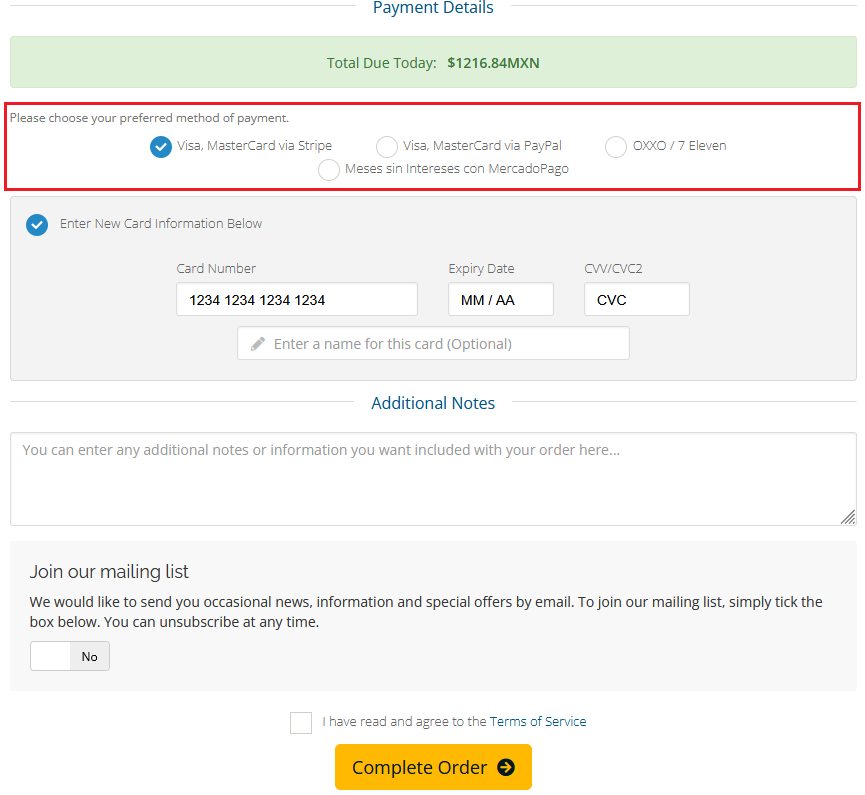
a) Visa, Mastercard via Stripe: Pay with a credit or debit card.
b) Visa, Mastercard via PayPal: Pay with a credit or debit card or pay with your PayPal account.
c) OXXO: Pay in cash by presenting the QR code directly at the checkout.
d) Meses sin intereses MercadoPago: Pay from your MercadoPago account or with a credit card in interest-free installments.
3. Once we have selected our payment method, we complete the details and select the box that says "I have read and agree to the Terms of Service", and then we click on Complete Order.
With this, we will have everything we need to make the payment with a debit or credit card.